Avalara AvaTax setup guide
Connect Avalara AvaTax to an application: credentials, company code, tax code mapping, customer exemptions, address validation, customs duty and import tax (CDIT), exemption certificates (ECM) and the call log.
Avalara AvaTax is a cloud-based service that calculates transaction tax in real time and files it. This page is the setup guide: what to enter, where, and how to tell that it worked.
There is nothing to install. AvaTax is connected from inside the dashboard, per application and per environment, and no deployment is involved.
What Throttle calls, and when
| When | The AvaTax call |
|---|---|
| Tax on a cart, a checkout, an order | CreateTransaction, type SalesOrder — a read-only quote that never reaches a filed return |
| Tax on a paid order | CreateTransaction, type SalesInvoice, committed, with the order number as the document code |
| A refund | RefundTransaction against the committed document |
| A cancellation | VoidTransaction |
| An address check | ResolveAddress (US and Canada) |
| Tax-code search in the dashboard | ListTaxCodes |
| Company lookup during setup | QueryCompanies |
| Credential check on save | Ping, then QueryCompanies |
Quotes and filed documents are different document types, which is why turning off document recording still leaves tax calculating.
Before you begin
From Avalara you need an account id, a license key, and at least one company on the account with nexus configured in the jurisdictions you sell into.
In Throttle you need the admin or developer application role. finance and viewer cannot connect a provider.
A company with no nexus is the most common setup surprise. AvaTax returns $0.00 tax for every address until nexus exists. Throttle checks for this when you connect and shows it as a warning on the connection, rather than letting you find out from a zero-tax order.
Connect to AvaTax
1. Confirm which environment you are in. The AvaTax service URL is not a field you type — it follows the workspace environment you are working in. Any non-production environment reaches sandbox-rest.avatax.com; the production environment reaches rest.avatax.com. To connect production credentials, switch the environment selector in the top bar to production first. The connect dialog states the resolved environment as read-only text, so you can see which AvaTax host your credentials are about to be sent to before you type them.
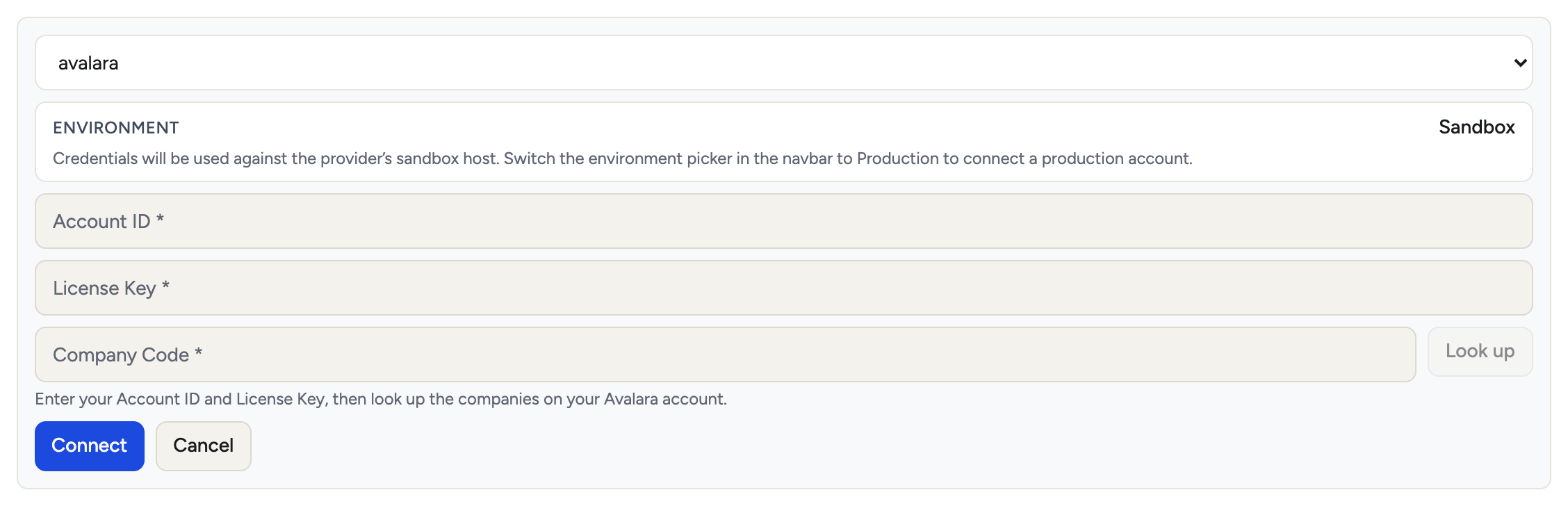 2. Go to App → Tax → Tax providers → Connect new →
 avalara. Enter:
| Field | Notes |
|---|---|
| Account ID | Provided when your AvaTax account was activated |
| License Key | Provided when your AvaTax account was activated. Masked in the dashboard and never returned by the API — responses replace credential values with placeholders, so the UI can show that a credential is set without exposing it |
| Company Code | Chosen in step 3, from the companies on your account |
Credentials are held per workspace, application and environment. A sandbox connection and a production connection are separate records and never share a key.
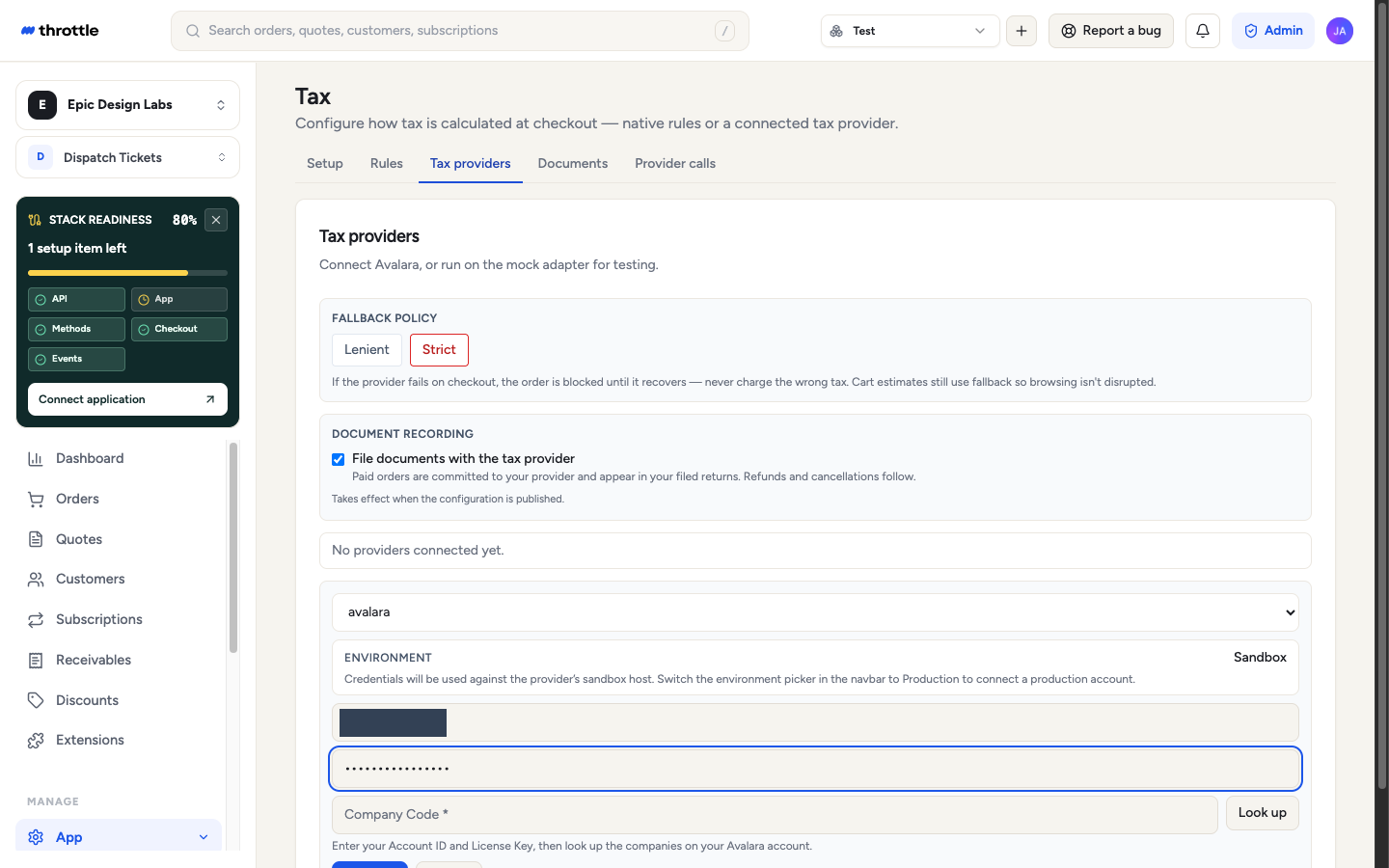
3. Look up your company. With the account id and license key filled, Look up calls QueryCompanies and the company field becomes a picker showing each company code and name. If the account holds exactly one company it is selected for you. The field stays free text if the lookup fails, so a provider outage slows setup down instead of blocking it. The lookup runs on the credentials as typed and stores nothing — nothing is saved until you save the connection.
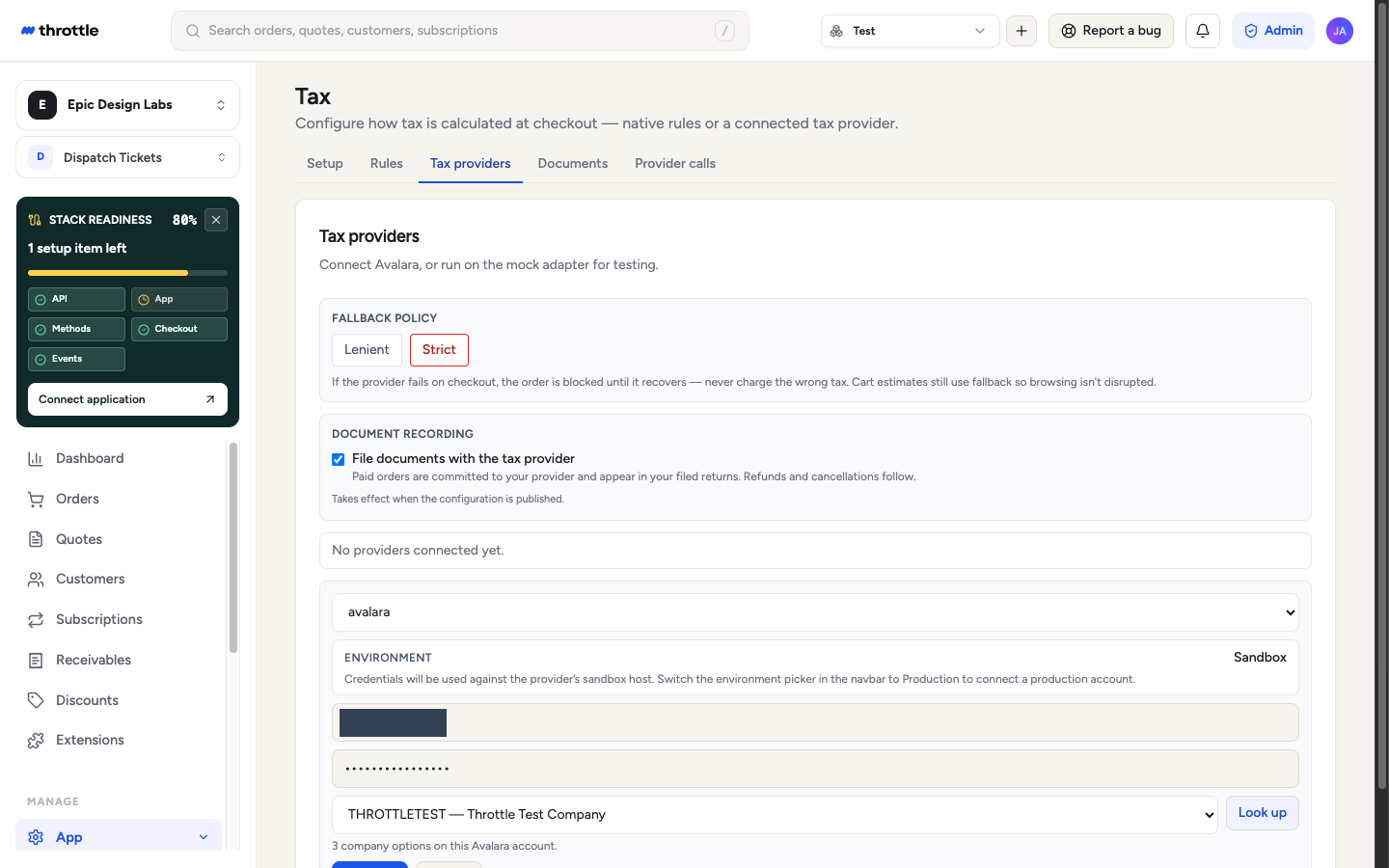
4. Save. Saving verifies: it runs Ping, then QueryCompanies, and tells you which of four things happened.
| Result | Meaning |
|---|---|
| Connected | Credentials are valid and the company exists |
| Connected, with a warning | Usable, but something was worth saying: the company has no nexus, its base currency differs from the application’s, or the company list could not be read so neither could be checked (re-verify — that one usually clears) |
| Invalid credentials | Ping reported not-authenticated, or the call returned 401 |
| Invalid configuration | That company code is not on the account — the message names the codes that are |
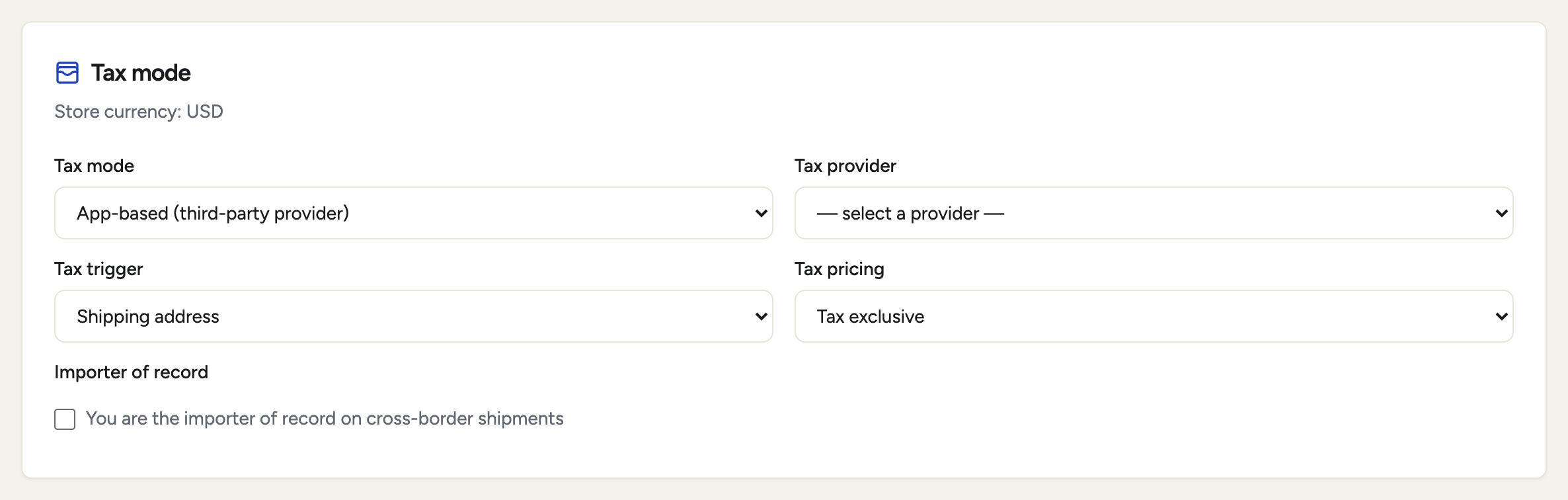
 5. Switch tax to the provider. On App → Tax → Setup, set tax mode to App-based (third-party provider) and press Save. Tax mode is the only calculation switch; there is no second one to fall out of sync with it.
Save publishes: it takes effect immediately for every checkout in that environment. There is no second button to press, and nothing you saved is left sitting as an unpublished draft.
Document recording
Document recording, on the Tax providers page, decides whether Throttle writes to your AvaTax account at all.
- On (the default) — a paid order is committed as a
SalesInvoiceand appears in your filed returns. Refunds and cancellations follow it. - Off — quote only. Tax still calculates on every cart and order, because quotes were always the read-only
SalesOrdertype, but nothing is committed, refunded or voided in AvaTax.
Turn it off if you file from another system and want Throttle only for the numbers. It is per application and versioned with the rest of the published config.
The document code is the order number. AvaTax requires it to be unique within the company, while Throttle order numbers are unique within an application — so two applications filing into one AvaTax company can produce the same code for two different orders. Throttle checks the order total before it reuses an existing document, and refuses the filing rather than binding your order to someone else’s document, which is what would later be refunded against. The document shows as failed with both totals named. The fix is either a distinct order-number prefix per application, or a separate AvaTax company per application.

Map tax codes to items
Throttle does not store a product catalogue — line data arrives in your cart or checkout payload — so an item’s AvaTax tax code resolves at three levels, most specific first.
- Per line item. The payload carries
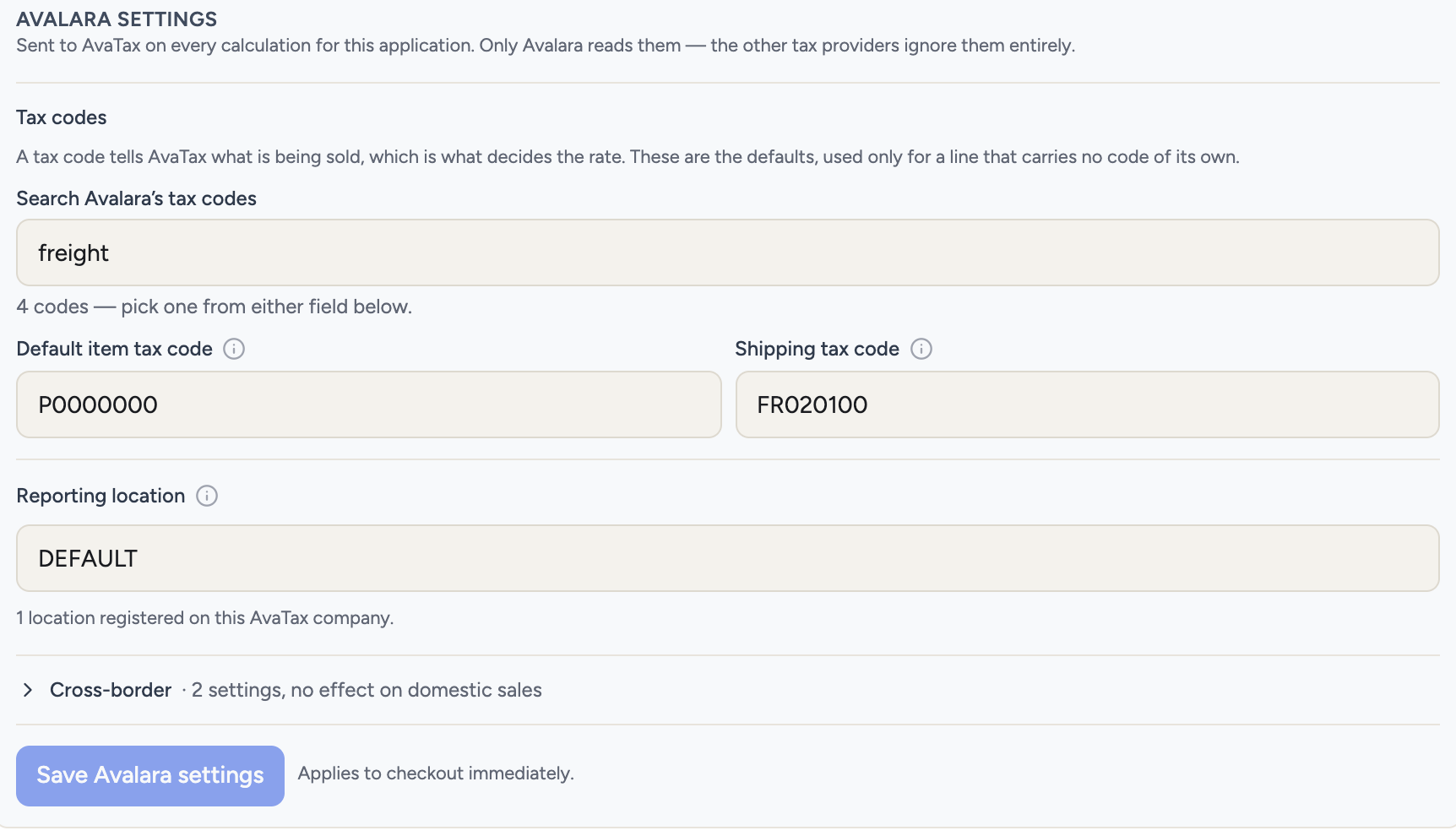
taxCategoryon the line. This is the normal path when your own catalogue already knows its tax codes. You can also set it by hand with no integration work — every line on a quote has a Tax code field, in New quote and in the working-revision editor, which writes the sametaxCategory. - Application default. Default item tax code, under Tax codes in the Avalara settings card on the Tax providers page, covers any line with no
taxCategory. Shipping tax code beside it does the same for shipping — typicallyFR020100. Both fields searchListTaxCodes, so you pick from Avalara’s catalogue rather than typing a code from memory. - Neither set. The amount is still sent and AvaTax decides taxability without a code.
The full list of AvaTax system tax codes is at taxcode.avatax.avalara.com.
If you keep an item catalogue in AvaTax, that wins. Throttle sends your SKU as itemCode on every line, so an item registered under Items on your AvaTax company resolves its own tax code there — and it takes precedence over both the code on the line and the application default. Verified against the AvaTax sandbox: an item registered as NT taxed at 0.00 even when the line was sent with P0000000. Newly created items take up to a minute to index before that happens. This is the mapping we’d point a larger catalogue at: it lives in one place, and every system that sends the same SKU agrees.
File by outlet: reporting location
Some jurisdictions require a return per outlet — the store, branch or warehouse a sale is reported from. Reporting location, directly under the tax codes in the Avalara settings card, sets the AvaTax reportingLocationCode for the application.
The field searches the Company Locations registered on your AvaTax company, so the code you pick is one AvaTax already recognizes. A code that is not on that list is flagged before you save, because AvaTax rejects an unregistered location when the document is created — that is at commit time, after the buyer has been charged, not when you save the setting.
Leave it blank if the application is a single location with no special outlet filing. Blank is a valid answer; Throttle omits the field entirely rather than sending an empty value.
The same code goes on the quote as well as the filed document. In an outlet-filing jurisdiction the location can change the rate, so pricing from one location while filing from another would charge the buyer one number and remit another.

Selling into the EU: VAT
AvaTax handles VAT through the same calls as sales tax, but four things only matter once you cross a border. Each is optional — none of them affects a domestic US sale.
Who moves the goods
Transport responsibility, behind Cross-border in the Avalara settings card, records who is responsible for moving the physical goods: Buyer, Seller, Third party (for seller), Third party (for buyer), or None. In several EU regimes that answer decides where a cross-border supply is taxed, so it is an input to the rate rather than a note on the paperwork.
The setting is the application’s default. Override it for a single order by setting transport on the order’s metadata:
{ "metadata": { "transport": "ThirdPartyForBuyer" } }Only those five values are accepted; anything else is dropped rather than sent, because AvaTax rejects the whole transaction on an unrecognized parameter value — at commit time, that is after the buyer has paid. Leave it blank on domestic sales. Blank means the parameter is not sent at all.
The same value goes on the quote and on the filed document, so the rate the buyer saw is the rate that is filed.
Overriding an application default on one order
Four of the application-level tax answers can be overridden for a single transaction, by putting the key on the cart’s metadata (the order copies it, which is what keeps the quote and the filed document agreeing):
| Key | Overrides | Use it when |
|---|---|---|
taxCategory (per line) | Default item tax code | The line is not general tangible goods |
shippingTaxCode | Shipping tax code | This order ships by a different means — FR020100 (common carrier) and FR010000 (your own vehicle) are different codes, and taxable in different states |
taxTrigger | Tax trigger | This order should be taxed against a different address — drop-ship, a gift, a digital line in a physical basket |
transport | Transport responsibility | This cross-border order moves on different terms |
{ "metadata": { "shippingTaxCode": "FR010000", "taxTrigger": "billing_address" } }That shipping code is worth a concrete example, because the difference is not cosmetic. On a $25 delivery into California, FR020100 is exempt and FR010000 is taxed $2.15 — the same order, the same address, a $2.15 difference decided by which truck it went on. Pick the code from the search field rather than typing one: AvaTax does not reject a freight code it does not recognize. It silently falls back to the general goods code and taxes the line, so a typo here is wrong in your returns rather than loud at checkout.
taxTrigger accepts only shipping_address, billing_address and customer_address. It moves the ship-to address and nothing else: an order cannot switch taxation on or off. If the application’s tax trigger is disabled, it stays disabled; if it is enabled, an order cannot disable it. Whether you tax at all is a published-config answer you can see on the Setup tab, not something a payload decides. Any unrecognized value in either key is dropped rather than sent.
Prices that already include tax
Whether prices include tax is normally an application-wide answer — Tax pricing on App → Tax → Setup, either tax_exclusive or tax_inclusive. A single line can disagree with it in either direction by carrying taxIncluded in its own metadata:
{ "name": "Ticket", "unitPrice": 12000, "metadata": { "taxIncluded": true } }true means the amount already contains tax and AvaTax should carve it out; false means it does not, even on a tax-inclusive application. Omit the key and the line follows the application setting. The quote and the committed document read the same key, so a line quoted gross is never filed net.
The VAT code AvaTax returned
Every tax line Throttle stores keeps three values straight from the engine alongside our own normalized type:
vatCode— AvaTax’s own code for the VAT that applied, such asIE_S_L_230_C. Present on VAT jurisdictions; absent on US sales tax, which has no VAT code.taxName— the engine’s name for the tax, such asStandard.rateTypeCode— its rate classification:Sstandard,Rreduced,Zzero.
They appear on the calculation response, on GET /api/v1/carts/{cartId} under taxLines[], and are persisted with the cart’s tax lines — so the record shows which VAT actually applied rather than only that VAT applied. The full AvaTax request and response for any calculation is also readable under App → Tax → Provider calls.
AvaTax’s own wording on the invoice
When AvaTax returns messaging about a transaction — a reverse-charge notice, an intra-community supply note — Throttle stores it verbatim on the calculation, carries it to the order, and prints it on the customer invoice. It is readable as providerMessages on a calculation response and as taxProviderMessages on the cart and the order. AvaTax does not return this as plain text: it returns one envelope listing every candidate message and which lines each applied to, so Throttle expands it into the applicable text itself — Article 138.1 - Directive 2006/112 EC, not the envelope. In several member states the engine’s own wording is what makes the invoice compliant, so it is reproduced rather than paraphrased, and it prints alongside Throttle’s own reverse-charge line, not instead of it. Nothing is shown when AvaTax returns no messaging.
Customs duty and import tax (CDIT)
On a cross-border sale, AvaTax can return the import duty and import VAT alongside the ordinary tax, so the buyer sees a landed cost rather than a bill at the border. Throttle displays them apart from tax, files them on the document, and records what the border actually charged when it differs.
What has to be true first
| Requirement | Where | If it is missing |
|---|---|---|
AvaLandedCost on the account | Avalara | No duty is returned at all |
| Seller is importer of record, on the destination’s customs-duty nexus | AvaTax → Settings → Where you collect tax | Duty is ESTIMATED, not charged — see below |
| A genuinely cross-border sale | The order | AvaTax refuses the customs document outright |
The nexus flag is what decides whether duty is charged. Not the subscription, and not anything on the Throttle side. With
AvaLandedCostlive but the destination nexus’sisSellerImporterOfRecordunset, a US → IE sale of 950.00 returnstotalTax: 0, no charged duty line, and a message saying the buyer is the importer of record and will pay at the border. Set it and the same request returns the duty and the import VAT as charged tax. The document cannot override the nexus in either direction — sendingisSellerImporterOfRecord: trueon the transaction is echoed back asfalsewhile the nexus says false. AvaTax caches nexus configuration, so allow about a minute after changing it.
Cross-border means crossing a customs frontier, not crossing a border. Goods moving between EU member states are inside a customs union, so there is no customs document to file. AvaTax says so plainly — “Customs document type valid only for cross border transactions. Goods moving between EU Member States are within a customs union.” A Germany → Netherlands sale can carry VAT but never duty; a US → Ireland sale carries both.
Classify your items
Customs duty is rated from a Harmonized System code, not a tax code, so classification is its own mapping. App → Tax → Classifications holds one row per item code:
| Field | Notes |
|---|---|
| Item code | Your own SKU. Matched against the line’s referenceId — see the warning below |
| Destination country | Blank means every destination. A country-specific row overrides the blank one, field by field |
| HS code | 6 to 10 digits, no dots or spaces. 6204.42.00 is rejected; 6204420000 is accepted |
| Product category | Full breadcrumb path, > separated; multiple paths separated by ; |
| Country of manufacture | Only sent alongside a preferred-programme claim — see the warning below |
| Weight and volume | NetWeight, GrossWeight, ShippingWeight, NetVolume, which some tariff lines require to rate |
A row needs an HS code or a product category; one with neither classifies nothing and is refused.
The mapping is keyed on
itemCode, which comes from the cart line’sreferenceId. A line sent without one produces no item code, so the Classifications table is never consulted and the mapping silently has no effect. If you send line items through the API, sendreferenceId.
Country of manufacture, on its own, removes the duty. Measured against the live engine: a US → IE line went from 95.00 duty and 240.35 import VAT to no duty at all the moment a country of manufacture was added, with every other field unchanged — and the same happened with
IsPreferredProgram: falsealongside it. Presence is enough. Throttle therefore sends it only paired with a preferred-programme claim, in both directions. Fill the field if you claim a trade preference; leave it blank otherwise.
When there is no HS code
Avalara’s own “estimate taxes” scenario has no tariff code on the line, and AvaTax estimates one. It estimates from the line DESCRIPTION — not from the product category, and not from the SKU. Measured US → IE at 950.00:
| Line description | Category sent | Duty returned |
|---|---|---|
Leather shoes, outer sole rubber | none | 8% |
Leather handbag, women's | none | 3% |
Very long cotton dress | Clothing > For Women > Dresses | 12% |
Very long cotton dress | none | 12% |
Cuban Links (a product NAME) | Man > Jewelry ; Gold > Bracelet | 0.00 |
Two things follow. The category does not pick the tariff line — the clothing figure is identical with it and without it — and a product name classifies as nothing. Send a description of the goods, not a model name.
Declare who clears the goods
App → Tax → Tax providers → Avalara settings → Cross-border carries the declaration that rides on the document:
| Control | Sent as | Notes |
|---|---|---|
| Transport responsibility | Transport | A closed value set — an unrecognised value fails the whole transaction |
| Importer of record | document flag | Declares who clears the goods. It does not decide what AvaTax charges |
| Delivery terms | DeliveryTerms | Eleven Incoterms, not the two the badge prose names |
| Buyer’s agent | IsBuyersAgent | |
| Default product category | line parameter | Applied to lines with no category of their own |
| Fiscal representation | IsCustomerRegisteredThroughFiscalRep, IsRegisteredThroughFiscalRep | Three states, not a checkbox — Not answered sends nothing, which is a different claim from No |
What the buyer sees
The order summary shows import fees apart from tax, in Avalara’s own order:
Subtotal
Shipping
Import fees          <- Show breakdown
  Duty
  VAT
Total
Duty is aggregated into one line for the buyer, because a summary with two
duty rows at different rates is a worse summary. The per-rate detail is on the
wire and in App → Tax → Provider calls: a two-line order returns two
LandedCost/ImportDuty rows at their own rates plus one Output/O row. The
buyer sees what they owe; the filing keeps the detail per rate.
De minimis is not a message. Below the threshold AvaTax changes the duty basis rather than announcing anything: Ireland charges a flat amount under €150 against an ad valorem rate at or above it, and every product tested returns the same flat charge whatever its tariff line. Do not look for a notice — read the figures.
Engine messaging follows the same logic. AvaTax emits a customs message when the duty is an estimate the buyer will pay at the border, and says nothing when the seller is the importer of record and the duty is genuinely charged. A charged duty needs no notice.
Record what the border actually charged
The sales invoice files the estimate made at the time of sale. Parcels clear at something else — exchange rates move, classifications get corrected, and a parcel can cross a de minimis threshold on a different day.
On App → Tax → Documents, a committed SalesInvoice for a cross-border
order carries a File customs control. Enter the duty and the import tax from
the shipper’s receipt and Throttle files a CustomsInvoice against the same
order, under its own document code, and shows the difference beside the sales
invoice rather than reconciling it away.
The receipt gives one total, so Throttle apportions it across every line by value — which is how an ad valorem duty was assessed in the first place — with the largest line absorbing the rounding remainder so the filed total equals the receipt to the cent. AvaTax requires a line-level override on every line of a customs document, freight included, and refuses the filing when any line lacks one.
Identify a customer’s exemption
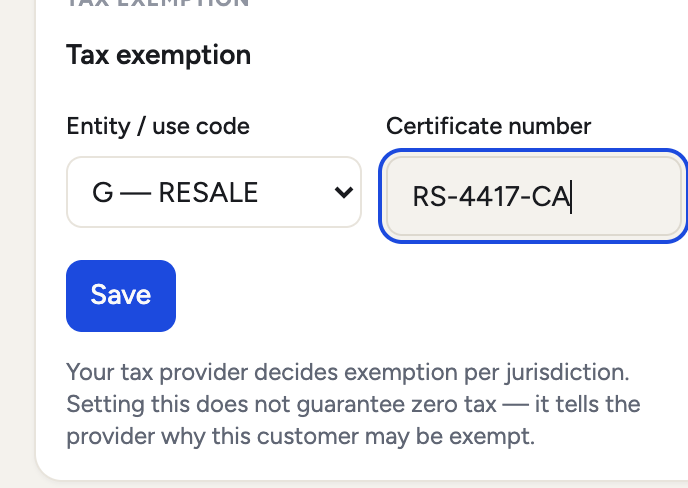
Open Customers → a customer. The Tax exemption block holds two values, both sent to AvaTax on every calculation for that customer:
- Entity/use code — picked from Avalara’s own catalogue, which Throttle loads live. If the catalogue cannot be reached the field accepts the letter code directly, so setup is never blocked. These are Avalara’s codes:
Afederal government,Bstate government,Gresale,Jdirect pay permit, and so on throughRnon-resident (Canada). - Exemption certificate number — for merchants not using Avalara ECMS.
A buyer’s VAT number is carried from the cart at checkout and sent as well, which is what drives reverse charge on cross-border EU B2B.
AvaTax decides exemption, per jurisdiction. Setting these values does not zero the tax by itself — Throttle never overrides tax on its own authority. It passes the inputs and files what AvaTax returns.
The customer code Throttle sends is the customer’s own code, falling back to throttle-guest for a guest checkout. That is the value AvaTax joins exemption certificates on, so certificates managed in AvaTax match a stable code.
Exemption certificates (ECM)
Avalara’s Exemption Certificate Management holds a buyer’s certificates and decides, per jurisdiction, whether they are exempt. Throttle mirrors the customer into ECM, requests certificates on their behalf, and shows what ECM holds — on the same AvaTax account, with no second credential.
Turn it on
App → Tax → Tax providers → Avalara settings → Exemption certificates. It is off by default, deliberately: mirroring a customer to Avalara discloses buyer data to a third party, and that should be a decision rather than a side effect of connecting a tax provider.
Then press Test ECM connection. It answers one of three ways:
| Result | Meaning |
|---|---|
| Connected. Avalara returned N exemption jurisdictions. | ECM is usable on this company |
| Your credentials work, but this company is not provisioned | CertCapture is not switched on for the company. It is self-service — requestCertificateSetup provisions it in a minute or two |
| An error | Credentials or connectivity |
This is deliberately not the tax connection’s own verify. That call proves the AvaTax credentials, which are already good on any account that calculates tax, so it answers “yes” for an account that cannot use ECM at all. The ECM test reads a real ECM catalogue instead.
The company is addressed by numeric id, which Throttle resolves once when you connect and stores, rather than spending a lookup per request.
The customer mirror
Once ECM is on, a customer is mirrored into CertCapture automatically — on create, on edit, and whenever their address is added, changed or removed. The mirror never blocks the write that triggered it: a slow or failing Avalara cannot fail a signup, and what went wrong is recorded on the customer instead.
ECM requires a complete address — line1, city, region, postalCode
and country, verified field by field against the live API. A customer missing
any one of them cannot be mirrored at all.
Region is AvaTax’s code, not the name. ECM answers
region: "Dublin"with “Field ‘region’ has an invalid length.” — it wantsD. Throttle resolves this for you against AvaTax’s own region list for the country, so either the name or the code is accepted and anything unrecognised is passed through for AvaTax to judge rather than guessed at.
When a mirror does fail, the customer’s Exemption certificates panel shows the reason Avalara gave. AvaTax’s own answer for an unmirrored customer is “Customer not found.”, which is true and useless — it names the symptom rather than the cause — so Throttle shows the recorded sync error in preference to it.
Request a certificate
On the customer, Exemption certificates → Request a certificate sends a CertExpress invitation, with the recipient pre-filled from the customer’s email. The buyer follows it to Avalara’s hosted flow and uploads their certificate there; it is linked to the customer record automatically.
Exposure zone and exempt reason are chosen from Avalara’s live catalogues. Note that the zones this account exposes are US states and Canadian provinces — a certificate is scoped to a jurisdiction, so a buyer outside that set has no zone to be exempt in.
Retrieve, view and revoke
Reload the customer and each certificate is listed with its exempt state, exempt reason and expiry.
- View opens the certificate PDF in the browser, where the browser’s own viewer provides print and save. It is streamed through Throttle rather than linked straight to Avalara, because fetching it needs the merchant’s Avalara credentials and those must never reach a browser.
- Remove unlinks the certificate from this customer. It does not delete it — a certificate can be linked to several customers, and deleting removes it from all of them.
Everything is logged
Every ECM call — the mirror, the catalogues, the invitation, the retrieval —
appears in App → Tax → Provider calls with its full request and response
body and the round-trip duration, retrievable by the merchant and retained for
90 days. Filter to ecm to see them apart from the tax traffic.
The buyer’s purchase order number
A B2B buyer’s own PO number rides onto the filed AvaTax document as
purchaseOrderNo, so the transaction Avalara holds matches the paperwork the
buyer’s auditor holds. It is reporting only — it never changes the tax.
Throttle reads it from the order’s metadata, checking purchaseOrderNo first
and then buyerReference. You do not have to set anything for the quotes flow:
the RFQ form already asks the buyer for their reference, and it is carried from
the quote to the cart to the order. For orders created through the API, set
either key yourself:
{ "metadata": { "purchaseOrderNo": "PO-1001" } }AvaTax caps the field at 50 characters and rejects the whole transaction when it is longer, so Throttle trims to 50 rather than failing a commit after the buyer has paid.
Validate an address
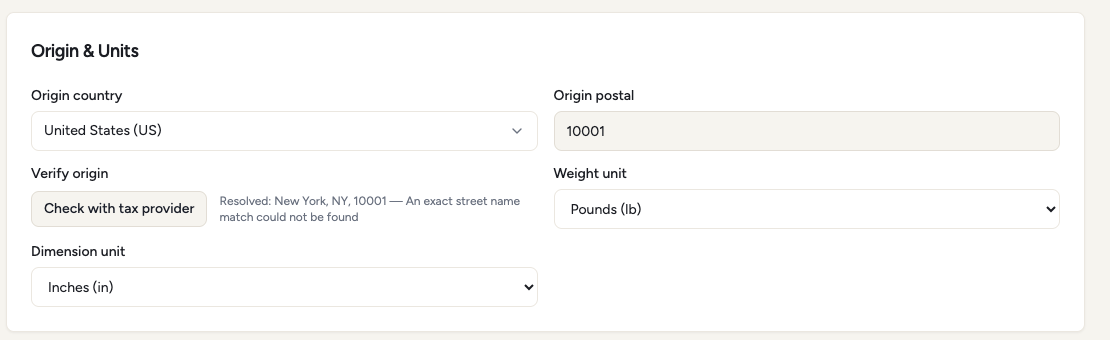
Addresses are checked against AvaTax in two places: your ship-from origin, on App → Tax → Setup → Verify origin, and the buyer’s address at checkout, before payment. Throttle calls ResolveAddress and shows the address AvaTax resolved — at checkout the buyer can apply it as typed by AvaTax. The origin form collects city, state, postal and country, which is what tax sourcing needs, so AvaTax resolves the jurisdiction and still notes that it could not match a street line; Throttle shows the resolved place alongside that note rather than calling a correct origin unresolvable.
ResolveAddress covers the United States and Canada. Throttle applies that filter itself: an address anywhere else is returned unvalidated rather than being sent to AvaTax and rejected. An address that cannot be resolved is reported as unresolved, never as a hard failure — blocking a sale because validation was unavailable is worse than accepting an unvalidated address.
Turning address validation off
The buyer’s address is validated automatically, when they press Continue. If you do not want that, clear Check addresses with the tax provider on Shipping and tax → Tax providers and save. No address is then sent to AvaTax for validation from either checkout or the origin check on that page, and the verdict everywhere becomes the same “not validated” you already get for a country AvaTax does not cover. Tax is still calculated, on the address as typed.
The switch is per application and versions with the published configuration, so turning it off in a sandbox environment leaves production untouched.
Review what was sent
Two pages show the traffic, without a support ticket.
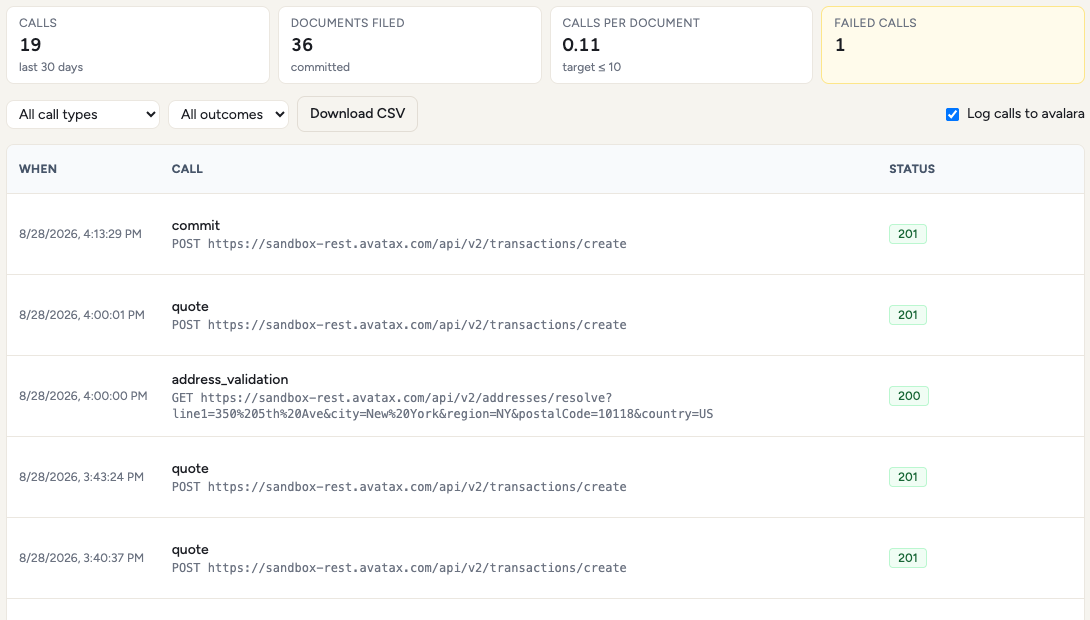
- App → Tax → Provider calls — every AvaTax call: type, duration, outcome, and the provider’s error verbatim when one fails. Logging is on by default and can be turned off from the same page. Rows are kept for 90 days.
- App → Tax → Documents — the document ledger: what was committed, refunded or voided, and against which order.
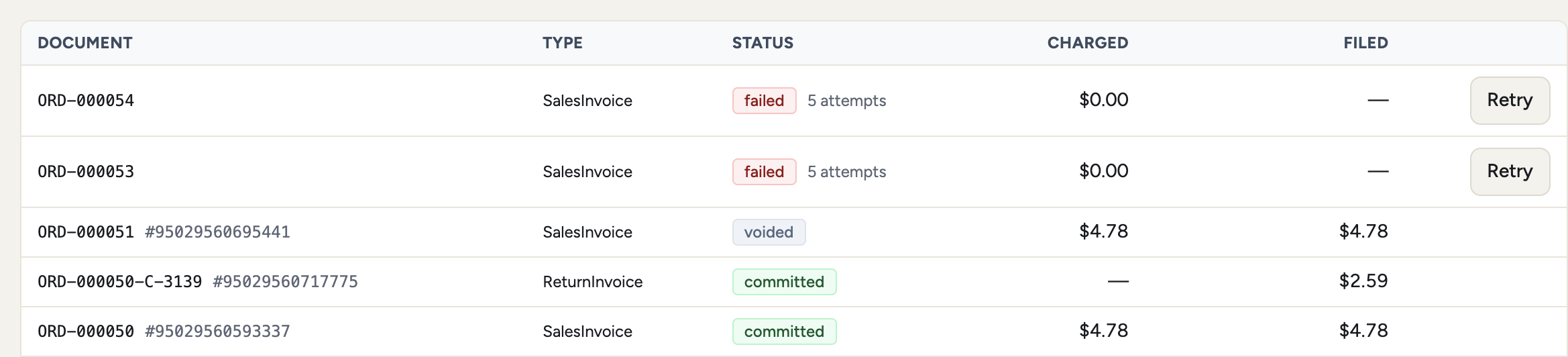 Throttle does not embed a link to the Avalara AvaTax Admin Console; sign in to Avalara directly for filing and returns.
If you build your own checkout
The dashboard and the hosted checkout already handle everything below. Building directly against the API means handling four things the HTTP status code does not tell you.
A calculation can fail inside a 200. POST /api/v1/shipping-tax/carts/{cartId}/calculate
answers 200 whether or not AvaTax answered. Read data.status and
data.errors, not the status code alone:
data.status | What it means |
|---|---|
estimated | A cart estimate. Check data.warnings for provider_fallback — AvaTax was unreachable and Throttle’s own rules answered instead, so the figure is an estimate in a stronger sense than usual |
final | Locked checkout totals, calculated by AvaTax |
failed | Nothing was calculated, and data.errors says why. provider_unavailable is the strict fallback policy declining to guess |
A blocked sale is a 409, on both conversion rails. With the tax fallback
policy on Strict — the default — a checkout_final that AvaTax could not
answer makes the order impossible to create:
POST /api/v1/carts/{cartId}/finalize           → 409 tax_calculation_failed
POST /api/v1/checkout-sessions/{id}/complete   → 409 tax_calculation_failed
Both refuse before anything is captured, so a buyer is never charged against a guessed rate. Cart estimates keep answering throughout — only the committed sale is held — and the same cart converts at the real rate once the connection recovers. Handle the 409 by telling the buyer to retry rather than by falling back to your own number.
Line identifiers reach AvaTax; per-line tax codes travel as metadata. There
is no dedicated tax-code field on a line item. Send the AvaTax code as
metadata.taxCategory on the line — the same key the override table above uses.
The line’s merchant identifier is sent separately, as AvaTax’s itemCode: from
referenceId on a cart line and from sku on a quote line (a quote carries its
sku across to referenceId when it converts). That is worth knowing because a
code registered against that item in AvaTax’s own Item catalogue takes
precedence over the taxCode on the line — if a line is taxed as something you
did not ask for, look in the catalogue before looking at your payload.
Choosing a shipping method does not recalculate tax. POST /api/v1/carts/{cartId}/shipping
records the rate you pass it and returns the cart with that freight in the
total, but the tax on that response is the tax from the last calculation —
which ran before the cart had any freight on it. Selecting a method is deliberately not a tax event: it would
put an AvaTax call behind every click in a shipping picker. Recalculate before
you show the buyer a total, passing the method you are pricing:
POST /api/v1/shipping-tax/carts/{cartId}/calculate
{ "kind": "cart_estimate", "selectedShippingMethodId": "ground" }
calculate prices and taxes the freight in the same call, so it is the one that
has to run last. The hosted checkout recalculates on every shipping-method
Continue for exactly this reason.
Before you go live
- A non-production environment is a real rehearsal. Separate connection, separate credentials, AvaTax sandbox. Publishing there has no effect on production.
- Nexus decides the tax, not Throttle. Zero tax on a real address almost always means missing nexus on the AvaTax company.
- Calculation failures are not silent. By default, if AvaTax cannot be reached during final checkout, the checkout is blocked rather than completing at the wrong tax. It is a per-application setting, and the reason to keep it strict is that an undertaxed order is a liability you find at filing time.
- Refunds depend on the commit. A refund is a
RefundTransactionagainst the committed document, never a hand-built return, so the tax refunded is the tax that was filed. - Duty depends on the nexus flag, not on the subscription. If you sell cross-border, check that the destination country’s customs-duty nexus has the seller marked as importer of record. Without it AvaTax returns the duty as an estimate the buyer pays at the border, and charges nothing — which looks like working software right up until the buyer is surprised at delivery.
- Classification needs an item code to match on. The HS mapping is keyed on the cart line’s
referenceId. Lines sent without one fall back to AvaTax estimating from the description, which is a reasonable answer but not the one you configured. - Mirroring customers to Avalara is a disclosure. Exemption certificates are off by default for that reason. Turn them on deliberately, and remember that ECM refuses a customer whose address is incomplete.
Last updated September 16, 2026